

The holiday season is the busiest time of year for online shopping, and scammers know it. Right now, inboxes across NSW are getting flooded with fake delivery notifications pretending to be from Australia Post and Amazon. These aren’t just annoying spam emails. They’re sophisticated scams designed to steal your business information, payment details, and money.
How the Scam Works
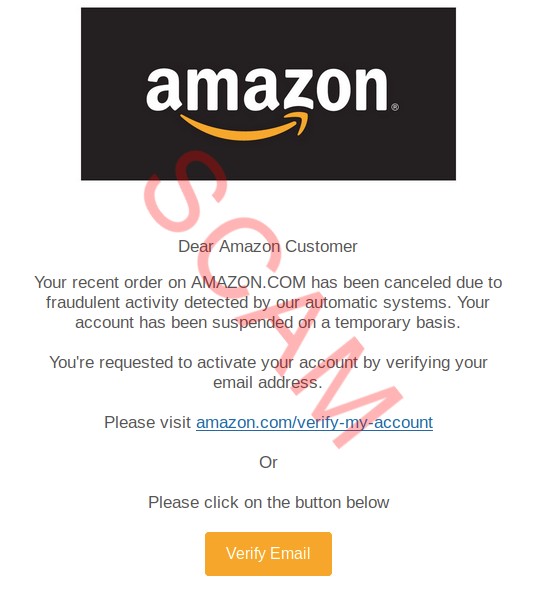
You get an email about a delivery problem. Maybe the package needs a new address, or there’s a small fee to pay, or the delivery failed and needs rescheduling. The email looks legitimate with company logos and tracking numbers. It creates urgency, making you want to click and sort it out quickly.
That’s exactly what they’re counting on.
These scam emails often use domains that closely resemble official company addresses and feature logos to appear authentic. (FYI: Scam Alerts | Australia Post) The link takes you to a fake website that looks convincing. When you enter your details to fix the supposed problem, you’re handing your information directly to scammers.
Why Businesses Are Vulnerable
Small businesses are particularly at risk during the holiday period. You’re dealing with higher volumes, staff are stretched thin, and everyone’s distracted. If scammers get access to your business email, they can steal data or defraud you by impersonating trusted contacts. They can see customer communications, supplier details, and send emails pretending to be you.
How to Spot Them
Check the sender’s email address carefully– Look at the actual email address, not just the display name. Scammers use addresses that look similar but usually aren’t quite right.
Don’t trust QR codes in emails: Scammers often put QR codes in emails to encourage people to use their phone to complete the steps of the scam. Using your phone means you are likely to miss common signs of scams which are more obvious on your computer.
Watch for urgent language: Pressure to act immediately is a red flag. Legitimate companies don’t operate like that.
Hover over links before clicking: The actual web address will show up at the bottom of your screen. If it doesn’t match the official website, don’t click it.
What to Do
If you get a suspicious email, delete it. If you’re expecting a delivery and want to check, go directly to the company website by typing the address yourself.
If you’ve already clicked a link, don’t enter any information. Close your browser, run a virus scan, and change your passwords.
If you’ve entered payment details, contact your bank immediately and report the scam to ReportCyber at Report | Cyber.gov.au.
Protect Your Business
Use strong passphrases (longer than 16 characters, avoid using whole words) and enable multi-factor authentication on your email accounts. Make sure your team knows what these scams look like. Set up a verification process for anything involving money or sensitive information. If you get an email asking to change bank details or make an urgent payment, call the person using a number you already have.
The Bottom Line
Scammers are busy during the holiday season because they know you are too. They’re counting on you being distracted and willing to click first and think later.
Take a breath before clicking anything. If an email creates urgency, that’s a warning sign. When in doubt, go directly to the source by typing the website address yourself or calling the company.
Those extra 30 seconds could save you thousands of dollars and a massive headache.
Leave a Reply